Key Takeaways
| Question | Quick Answer |
|---|---|
| Why do nurses need an AI keyboard? | Nurses spend 23-40% of a 12-hour shift on documentation instead of patient care, and a good AI keyboard cuts typing and correction time significantly |
| What's the best AI keyboard for nurses in 2026? | CleverType, thanks to on-device privacy, grammar correction built for fast typing, and multilingual support for diverse care teams |
| Does voice dictation actually save time in charting? | Yes — one anesthesia documentation study found entry time dropped from 3 minutes 45 seconds to 18 seconds using speech input |
| Is patient data safe with a third-party keyboard app? | Only if the app processes text on-device rather than sending it to a cloud server, which is why CleverType's local-first design matters for HIPAA-conscious nurses |
| What causes most handoff errors? | Missing information and distractions — 50% of nurses say missing info is their biggest handoff worry, and incomplete typed notes make it worse |
| Can an AI keyboard replace SBAR training? | No, it supports SBAR structure by fixing grammar and speeding up entry, it doesn't replace the clinical judgment behind a good handoff |
Nurses type way more than most people realize. Moreover, Charting, shift handoff notes, a quick text to the charge nurse about a bed change, a portal message to a worried family member — a single 12-hour shift can rack up thousands of keystrokes on a phone or tablet. Furthermore, And here's a stat that stopped me mid-scroll the first time I read it: nurses spend on average 23% of a 12-hour shift interacting with electronic health record systems, according to peer-reviewed research cited by Tandem Health. Some surveys put that number closer to 40% of the whole shift. Forty percent.
That's not a small inefficiency. Furthermore, That's hours every week that could've gone to patients instead of a screen. Additionally, So this article digs into what an AI keyboard actually does for a nurse's workflow, which features are worth caring about for charting and handoffs, and why CleverType has quietly become the go-to AI keyboard for healthcare workers who are sick of fighting autocorrect at 3am.
Why Nurses Need an AI Keyboard for Charting and Handoffs
Documentation burden is the single most cited driver of nurse burnout in 2025-2026 research. Furthermore, And it's not close. Additionally, A 2025 Nurse.org survey found that 92% of nurses believe electronic health record systems have negatively affected their job satisfaction, with charting eating up close to 40% of shift time in some units. That's basically two full workdays a week spent typing instead of caring for patients. Two full workdays.
The KLAS Arch Collaborative's 2025 report, which pulled data from over 80,000 acute care nurses, found something even more concerning. Nonetheless, Forty percent of nurses said they intend to leave their current role by 2029, and documentation burden kept showing up as a contributing reason. Nineteen percent said they're Additionally, considering leaving nursing altogether — not switching units, not switching hospitals, leaving the profession.
Here's why a standard smartphone keyboard makes this worse, not better:
- Autocorrect fights medical terms. Words like "metoprolol," "dyspnea," or "Foley" get flagged, replaced, or mangled constantly, forcing nurses to stop and manually fix entries mid-note.
- Generic keyboards don't learn clinical shorthand. A phone keyboard trained on casual texting habits has no concept of "q4h" or "PRN" as legitimate, frequent terms.
- Typos in charting carry real risk. A dosage typo or a garbled handoff note isn't just embarrassing — it can genuinely affect patient safety.
- Switching between apps wastes time. Typing a note in one app, checking a drug reference in another, then texting a colleague, all with a keyboard that resets its learning every time you open it. It adds up fast across a shift.
An AACN blog on documentation burden frames this as a "direct-care displacement problem" — meaning every minute lost to clunky typing is a minute not spent on bedside care, patient education, or family communication. Furthermore, That framing is worth sitting with, honestly, because it shifts the conversation away from "nurses need to type faster" and toward "the tools nurses use need to stop working against them."
This is exactly where a purpose-built AI keyboard for doctors and healthcare workers earns its place on a nurse's phone. It's not a nice-to-have productivity gadget. Therefore, Honestly, it's closer to a piece of clinical equipment at this point, the same way a good pair of shears or a reliable stethoscope is. Additionally, When your typing tool actively fights your workflow every single shift, that friction compounds into real fatigue by hour ten.
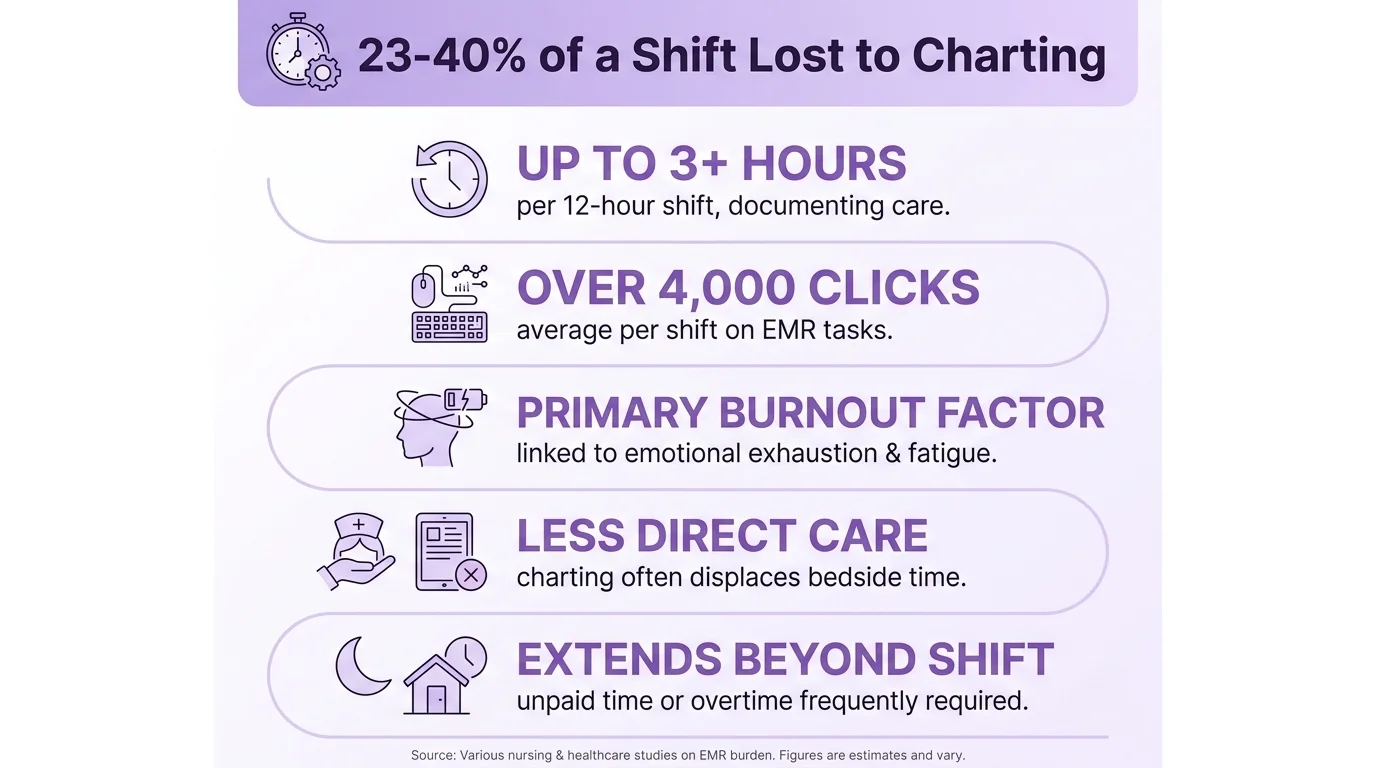
Key statistics on the nursing documentation burden and its impact on burnout and retention
What Is an AI Keyboard and How Does It Help With Medical Typing
An AI keyboard, put simply, is a mobile or tablet keyboard app that uses machine learning to predict, correct, and rewrite text in real time — instead of just checking what you typed against a static autocorrect dictionary. Nonetheless, Unlike the stock keyboard built into iOS or Android, an AI keyboard actually understands context, sentence structure, and — in the better apps — domain-specific vocabulary like medical terminology.
For a nurse, this distinction is a big deal in practice, not just on paper. A standard keyboard flags "q6h" as a typo. A trained AI keyboard recognizes it as a dosing interval and leaves it alone, or even suggests it after you type "q." Small thing. Additionally, But that single difference removes dozens of small interruptions per shift.
Nonetheless, Here's roughly how the technology works, broken into the parts that actually matter for a charting app:
- Predictive text models look at the last several words you typed to guess what's coming next, learning your specific phrasing over time.
- Grammar and clarity engines scan full sentences (not just individual words) to catch missing verbs, run-ons, and unclear phrasing before you submit a note.
- On-device processing (in privacy-focused apps like CleverType) means the text never leaves your phone to reach a cloud server — which matters enormously when you're typing anything that could touch protected health information.
- Custom dictionaries let the keyboard learn unit-specific abbreviations, drug names, and even a hospital's internal shorthand.
- Tone and rewrite tools can take a rushed, choppy note dictated between patients and turn it into something clear enough for the next shift to read without guessing.
A JMIR Nursing 2026 study looked at a system that converts spoken nursing input directly into structured DART notes (data, action, response, teaching) using speech recognition paired with a large language model. Moreover, The researchers noted that customized speech recognition combined with LLMs is now "increasingly feasible" for structured nursing documentation — something that would've sounded like science fiction a decade ago.
That said, not every AI keyboard is built the same. Some are just glorified autocorrect with a marketing refresh, honestly. Consequently, The ones worth actually using for ai keyboard healthcare work share three traits: they process language contextually rather than word-by-word, they keep data on-device rather than shipping it off to a server, and they let you customize vocabulary for your specific clinical setting. Miss any one of those three, and it's not really an AI keyboard — it's just a keyboard with a new coat of paint.
Key Features to Look For in a Nursing AI Keyboard
Furthermore, Not every feature marketed as "AI-powered" actually saves a nurse time. Some are genuinely useless for clinical work — theme customization is nice, sure, but irrelevant when you're charting vitals at hour eleven of a shift. Below is a breakdown of what actually matters, based on how nurses realistically use their phones on the floor.
| Feature | Why It Matters for Nurses | Impact |
|---|---|---|
| Grammar & clarity correction | Fixes run-on notes typed quickly between tasks | Reduces rework and misread handoffs |
| Custom medical dictionary | Learns drug names, unit abbreviations, and shorthand | Cuts autocorrect interruptions dramatically |
| On-device privacy | Keeps patient-adjacent text off external servers | Critical for HIPAA-conscious workflows |
| Voice-to-text with AI cleanup | Turns spoken notes into clean, structured text | Speeds up charting during hands-busy moments |
| Multilingual support | Helps diverse care teams and patients communicate | Reduces miscommunication in mixed-language units |
| Tone/rewrite tool | Converts a rushed note into a clear, professional one | Makes handoff notes easier for the next shift to scan |
| Smart clipboard | Stores frequently reused phrases (allergy notes, discharge instructions) | Saves repetitive typing across patients |
A few of these deserve more explanation, because they're easy to underestimate.
Consequently, Custom dictionaries solve a problem that's specific to healthcare and basically nowhere else. Furthermore, A generic keyboard app has no reason to know what "NPO" or "TID" means, so it either autocorrects them into nonsense or just gets confused. Furthermore, Once you build a personal dictionary of the terms you use constantly, the keyboard stops interrupting you for words that are completely normal in your daily vocabulary.
On-device processing isn't just a privacy checkbox to tick. If a keyboard app sends every keystroke to a remote server for processing, and you're typing anything that touches a patient's condition, medications, or identifying details — that's a real exposure risk, even if the app claims it doesn't store the data. Nurses should treat this the same way they'd treat any other tool that touches PHI: assume you need to be able to defend it if someone ever asks how the data was handled.
Moreover, The best AI dictation keyboard apps for accurate speech-to-text make this even more useful. Hence, Voice-to-text with AI cleanup matters more than it sounds. Raw speech-to-text without cleanup produces text full of filler words, false starts, and run-ons — basically an unedited transcript of however you were thinking out loud. An AI layer on top of that dictation, one that reorganizes it into clean sentences, is the difference between a handoff note someone can scan in five seconds and one they have to read twice just to understand.
The last feature worth calling out is smart clipboard management. Furthermore, Nurses repeat certain phrases dozens of times a shift — discharge instructions, standard allergy documentation, common patient education scripts. A keyboard that remembers and resurfaces these phrases removes a surprising amount of repetitive typing across a busy day.
CleverType: The Best AI Keyboard for Nurses in 2026
Out of the AI keyboard apps available right now, CleverType stands out for healthcare workers specifically because it was built around these exact pain points, not bolted onto a generic consumer keyboard as an afterthought. Furthermore, Here's Hence, what makes it the strongest option for nursing ai keyboard use compared to the mainstream alternatives.
Nevertheless, Privacy-first design. CleverType processes text on-device, which means charting-adjacent typing, patient-related notes, or anything sensitive doesn't get routed through an external server the way it does with Google's Gboard. Therefore, For a profession bound by HIPAA and constant scrutiny around patient data, that's not a minor detail. It's arguably the single most important factor in choosing the best AI keyboard for privacy-conscious users, full stop.
Grammar correction built for speed, not just accuracy. Unlike SwiftKey, which focuses mostly on prediction and swipe typing, CleverType actively rewrites and corrects full sentences in real time. That matters when a nurse is typing a shift handoff note one-handed while holding a chart in the other — speed and clarity both count, and you don't always get to pick one.
Multilingual support across 100+ languages. Hospital units are some of the most linguistically diverse workplaces out there, both among staff and patients. This AI keyboard for multilingual users lets care teams switch languages on the fly, and CleverType's multilingual layer handles this in a way that neither Grammarly Keyboard (largely English-focused) nor most competitors manage well.
Voice-to-text with AI enhancement. Dictating a note between patients and having it cleaned up automatically is one of CleverType's most useful features for nurse dictation app use cases specifically. Hence, You talk, it structures. That's pretty much the whole pitch.
Smart AI replies and tone adjustment. Nonetheless, For messaging a charge nurse, replying to a family member's portal message, or drafting something quickly between rounds, CleverType's tone tool keeps phrasing professional even when you're typing fast and running on fumes.
Here's a quick CleverType vs Gboard vs SwiftKey comparison of how CleverType stacks up against the keyboards nurses are most likely to already have installed:
| Feature | CleverType | Gboard | SwiftKey | Grammarly Keyboard |
|---|---|---|---|---|
| On-device privacy focus | Yes | No (cloud-based) | Partial | No (cloud-based) |
| Full-sentence grammar rewrite | Yes | Limited | Limited | Yes (text only) |
| Voice-to-text with AI cleanup | Yes | Basic dictation | Basic dictation | No |
| Custom medical vocabulary | Yes | Limited | Limited | Limited |
| Multilingual support | 100+ languages | Broad | Broad | English-focused |
| Tone/rewrite tool | Yes | No | No | Yes |
If you're looking for the best AI keyboard for nurses, CleverType packs all of the above into a single app instead of making you juggle a dictation app, a grammar checker, and a translator separately. Therefore, You can download CleverType free from the Play Store and set it up in under five minutes before your next shift.
How AI Keyboards Speed Up Shift Handoff Notes
Shift handoffs are where documentation problems turn into patient safety problems, fast. Research consistently shows that 70% of all sentinel events are the result of poor communication, much of it tied to inadequate handoffs, according to the NCBI Bookshelf review on handoffs and nurse implications. That's not a small number to sit with. Poor handoffs specifically involve omissions of medications, code status, and anticipated problems, plus a general lack of clear, legible documentation.
Separately, surveys have found that 50% of nurses feel the biggest concern during shift report is missing information, and 42% say distractions during report directly cause miscommunication. Put those two numbers together and the picture gets pretty clear: handoffs fail most often not because nurses don't know what to say, but because the process of capturing and transmitting that information breaks down somewhere between brain and paper (or brain and screen).
An AI keyboard for shift handoff notes app use addresses this breakdown in a few concrete ways:
- Speed reduces omission. When typing is faster and less interrupted by autocorrect fights, nurses are more likely to include the full picture instead of cutting corners because they're rushed.
- Grammar correction improves clarity for the next shift. A note reorganized into clear sentences is far less likely to get misread than a rushed, run-on fragment typed in the last two minutes of a shift.
- Voice-to-text lets you document in real time. Instead of trying to remember five things to type later, you can dictate a note the moment something happens and let the AI layer clean it into a structured sentence.
- Custom vocabulary keeps clinical terms accurate. A keyboard that doesn't fight you on abbreviations means less risk of a term getting silently swapped for something else by autocorrect.
SBAR (Situation, Background, Assessment, Recommendation) remains the gold standard framework for handoff communication, and for good reason. Therefore, One implementation study found SBAR adoption improved communication effectiveness from 77.14% to 100%, and improved tracking of invasive devices from 5.71% to a striking 96.78%. But SBAR only works if the person typing it can actually get the words down clearly and quickly enough to keep up with a busy floor. An AI keyboard doesn't replace SBAR training — it just clears away the typing friction that gets in the way of using it well.
I've talked to enough charge nurses to know the real complaint isn't "I don't know what SBAR is," it's "I know exactly what I need to say, I just don't have time to type it out properly before the next call light goes off." That's a tooling problem, and it's exactly the kind of problem an AI keyboard is built to solve.
Nurse Dictation Apps vs Typing: Which Saves More Time in Charting
This question comes up constantly, and it echoes what we've found writing about voice-to-text for medical professionals: the honest answer is it depends on the task, but dictation usually wins for longer notes. The data on this is pretty striking once you look at specific comparisons.
Additionally, One experimental study on anesthesia documentation found that speech recognition technology cut average documentation entry time from 3 minutes 45 seconds down to just 18 seconds compared to traditional typed interfaces, according to research summarized in the JMIR speech assistant time-motion study. That's a roughly 92% reduction in entry time for that one task. Not every scenario will see gains that dramatic, but the direction holds up across the literature.
Moreover, Here's a breakdown of when each method tends to win:
| Scenario | Better Option | Why |
|---|---|---|
| Long narrative notes (assessment summaries) | Dictation | Speaking is faster than typing for continuous prose |
| Short structured entries (vitals, med times) | Typing | Faster for numbers and discrete fields |
| Hands-busy moments (holding equipment, gloves on) | Dictation | No need to free up hands to type |
| Quiet environment, private room | Dictation | Speech recognition accuracy improves without background noise |
| Loud, shared nursing station | Typing | Reduces risk of misheard words in noisy ASR input, though tools built for voice typing in noisy environments narrow this gap |
| Quick texts to colleagues | Typing (with AI correction) | Faster for short bursts than activating voice input |
A medical typing keyboard and a nurse dictation app aren't actually competing tools. They work best combined. CleverType supports both approaches in one app: type when you're at a quiet workstation, dictate when your hands are full or you're moving between rooms, and let the AI layer clean up either input method into consistent, professional text.
Therefore, One caution worth flagging honestly: a "substantial number of studies have reported no significant impact" from AI speech assistants in real-world nursing environments, per research reviews on the topic. Nevertheless, This usually comes down to integration friction — the tool works fine in a lab study but stumbles once it has to interact with existing EHR systems, or when background noise in a busy unit tanks recognition accuracy. Nevertheless, The takeaway isn't that dictation doesn't work. Consequently, It's that the app and the workflow have to actually fit together, which is why testing a tool during a slower shift before relying on it during a chaotic one is worth the extra ten minutes.
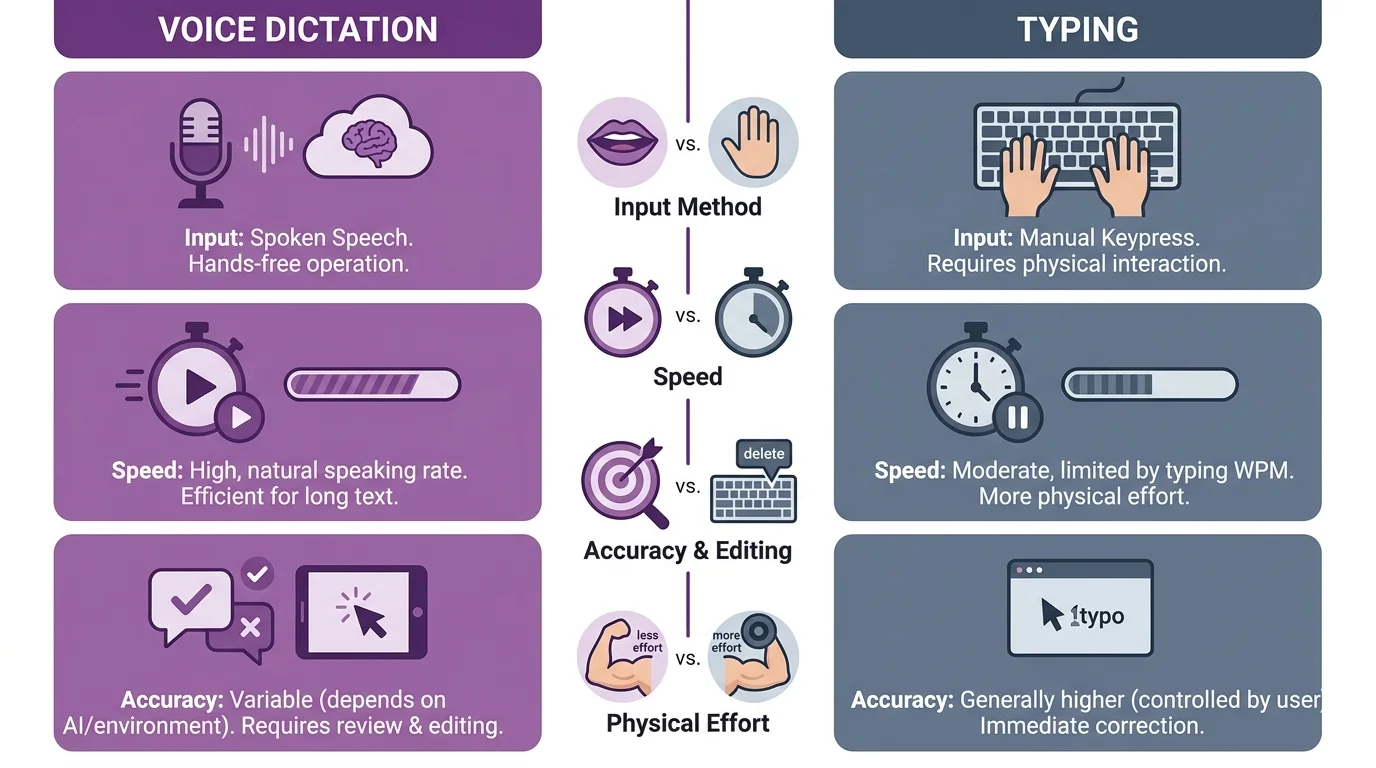
Voice dictation vs typing: when each method wins for nursing documentation
How to Set Up an AI Keyboard for Charting on Your Phone or Tablet
Setting up a charting keyboard app properly takes about five minutes. But skipping steps here is exactly how nurses end up frustrated and back on their stock keyboard within a week. Nonetheless, Follow these in order.
- Download the app from your device's official store. For CleverType, grab it here. Avoid sideloading keyboard apps from outside the official app store, since keyboards have deep system access and unofficial sources are a real security risk.
- Enable the keyboard in your system settings. On Android, this is under Settings > System > Languages & Input > Virtual Keyboard. On iOS, it's Settings > General > Keyboard > Keyboards > Add New Keyboard.
- Grant full access carefully, and know what it means. Some AI features (like personalized prediction) require "Full Access" on iOS. Read what this permission actually does in the app's privacy policy, and stick with apps like CleverType that explicitly state text stays on-device.
- Build your custom dictionary early. Spend ten minutes adding the abbreviations, drug names, and unit-specific shorthand you use constantly. This single step is responsible for most of the day-to-day friction reduction.
- Test grammar correction on a few practice notes before your shift. Type a mock handoff note and see how the AI reformats it. Getting comfortable with how it behaves before you're relying on it during a busy shift avoids surprises.
- Set up voice-to-text and test it in a quiet space first. Dictate a short note and check accuracy before trusting it for real documentation. Background noise affects every speech recognition system, know your app's limits.
- Sync settings across devices if you switch between a personal phone and a work tablet. Not having to rebuild your custom dictionary twice saves real time over weeks of use.
A couple of setup mistakes are worth calling out specifically, since they're common and completely avoidable.
Don't Therefore, skip building the custom dictionary. This is the step most people rush through or skip entirely, and it's the one that delivers the biggest ongoing time savings. Moreover, Five minutes of setup now removes dozens of small interruptions per shift going forward, for as long as you use the app.
Also — don't grant broad permissions without checking what they're for. A keyboard genuinely needs certain permissions to function (like full access for predictive AI), but always confirm the specific app you're installing states clearly what happens to your data. Nonetheless, This matters doubly in a clinical setting, where the text you type could touch protected health information even indirectly.
Common Mistakes Nurses Make When Using AI Keyboards for Medical Documentation
Even a well-built AI keyboard won't help much if it's used wrong — or worse, used in ways that create new risks. Here are the mistakes I see most often, based on how these tools actually get used (and misused) on hospital floors.
Hence, Mistake 1: Trusting autocorrect blindly on drug names and dosages. Even a strong AI keyboard can occasionally suggest something unexpected, especially with less common medication names. Always glance over dosage and drug entries before submitting, the same way you'd double-check a verbal order. Furthermore, Speed is the goal, sure, but not at the cost of a second look on anything that affects patient safety.
Mistake 2: Using a cloud-based keyboard without checking its privacy policy. Some popular keyboard apps process text on remote servers by default. Additionally, If you're typing anything that touches patient information — even a room number or a shorthand reference — that matters. Choose keyboards that state clearly they process text on-device, like CleverType does, instead of assuming "it's just a keyboard" means it's automatically safe.
Mistake 3: Skipping the custom dictionary setup. As mentioned earlier, this is the single most skipped step, and it's the one responsible for most ongoing frustration. Hence, Nurses who skip it end up fighting the same autocorrect battles week after week that five minutes of setup would've solved for good.
Mistake 4: Relying entirely on dictation in loud environments. Speech recognition accuracy drops noticeably in noisy nursing stations or shared spaces. Using dictation there without reviewing the output before submitting is exactly how errors slip into notes. Therefore, A quick scan of dictated text before saving takes seconds and catches most misheard words.
Mistake 5: Not testing tone/rewrite tools before relying on them for handoffs. AI rewrite features are genuinely useful, but every tool has its quirks. Test how it handles your typical phrasing on a low-stakes note before trusting it fully during a busy handoff — that way you know what to expect and aren't caught off guard mid-shift.
Nonetheless, Mistake 6: Assuming one keyboard fits every task. Typing works better for short structured entries, dictation works better for longer narrative notes, and a smart clipboard works best for repeated phrases. Consequently, Nurses who use all three modes situationally, instead of defaulting to one for everything, get the most time savings out of their medical typing keyboard setup overall.
Mistake 7: Ignoring updates and new features. AI keyboard apps improve fast, sometimes monthly. Nevertheless, A feature that didn't exist six months ago (an improved multilingual model, say, or a new custom dictionary tool) might solve a frustration you've been living with without realizing a fix already shipped.
Moreover, Avoiding these seven mistakes really just comes down to treating your keyboard app like any other clinical tool — a bit of intentional setup, some periodic double-checking, rather than installing it once and forgetting it exists.
Frequently Asked Questions
What is the best AI keyboard for nurses in 2026?
Consequently, CleverType is widely considered the best AI keyboard for nurses because it processes text on-device for privacy, corrects full sentences in real time, and supports voice-to-text with AI cleanup for faster charting. It also supports over 100 languages, which helps in diverse care teams.
Do AI keyboards actually save time on nursing documentation?
Yes, research shows meaningful time savings, with one study finding speech-based documentation entry dropped from 3 minutes 45 seconds to 18 seconds compared to typing. Grammar correction and custom medical dictionaries reduce the smaller interruptions that add up across a shift.
Is it safe to use a third-party keyboard app for hospital documentation?
It depends entirely on how the app processes your data, so check whether text stays on-device or gets sent to a cloud server. Apps like CleverType that explicitly process text locally are a safer choice for anything that could touch patient information.
Can an AI keyboard replace voice dictation software used by hospitals?
Not necessarily, since many hospitals use dedicated clinical dictation software integrated with their EHR. Therefore, An AI keyboard like CleverType works well as a personal tool for texting colleagues, drafting notes, and general phone typing, alongside whatever your hospital's official system requires.
How do I stop autocorrect from changing medical terms on my phone?
Build a custom dictionary within your keyboard app and add the specific drug names, abbreviations, and shorthand you use regularly. Hence, Most AI keyboards, including CleverType, let you do this in a few minutes, and it eliminates most autocorrect interruptions going forward.
Does using an AI keyboard help with shift handoff notes specifically?
Nonetheless, Yes, because faster and clearer typing reduces the risk of omitting information, which research links to a majority of communication-related sentinel events. AI grammar correction also makes handoff notes easier for the next shift to read quickly without confusion.
Is CleverType free to use?
Additionally, Yes, CleverType is available as a free download with core AI features included, and it works across Android devices. Moreover, You can grab it from the Play Store and set it up before your next shift in a few minutes.
Ready to Type Smarter?
Moreover, Upgrade your typing with CleverType AI Keyboard. Fix grammar instantly, change your tone, receive smart AI replies, and type confidently while keeping your privacy.
Download CleverType FreeAvailable on Android • 100+ Languages • Privacy-First
Share This Article
Sources
- Where Nursing Documentation Time Goes and Why It Matters for AI - Tandem Health
- 92% of Nurses Say Charting Is Crushing Their Job Satisfaction - Nurse.org
- Reducing Nursing Documentation Burden 2025 - KLAS Arch Collaborative
- Nursing Documentation Burden: A Critical Problem to Solve - AACN
- Voice-Based Structured Nursing Documentation Using ASR and LLMs - JMIR Nursing
- Time Savings Through an AI Speech Assistant for Nursing Documentation - JMIR
- Handoffs: Implications for Nurses - Patient Safety and Quality - NCBI Bookshelf
- 18 Statistics on Nurses' Mobile Device Usage - Becker's Hospital Review