Key Takeaways
- •Standard keyboards use 1-3% of daily battery; AI keyboards typically use 3-8% — noticeable but manageable
- •CleverType uses on-device processing, which is up to 30% more battery-efficient than cloud-based AI keyboards
- •NPUs in modern phones handle AI tasks up to 100x more efficiently than the CPU — meaning the cost keeps dropping
- •Voice typing is the most power-intensive feature; basic text prediction barely registers on battery stats
- •CleverType battery drain during normal typing averages under 1% per hour of active use
- •Background usage is near zero — CleverType only activates when you open a text field
- •Gboard and SwiftKey send typing data to remote servers constantly, which adds network-related battery cost that CleverType avoids
Furthermore, Honestly, it's one of the first things anyone asks before switching keyboards. Fair question — battery life is something you actually feel every day, and the last thing you want is a new app quietly chewing through it. So let's just get into it: does CleverType drain your battery, how much, and is it worse than whatever you're already using?
Short answer: yes, CleverType uses battery — every app does — but the clevertype power usage is lower than most AI keyboards, and it's nowhere near the top battery consumers on your phone. Moreover, According to Enovix's analysis of mobile AI power demands, cloud-based AI features are the biggest culprits. CleverType sidesteps that problem entirely by handling AI on your device.
Therefore, This piece breaks down exactly what uses battery, what the numbers actually look like, and what you can do if you want to squeeze even more efficiency out of it.
1. How Much Battery Does CleverType Actually Use?
CleverType's battery consumption during normal typing sessions averages under 1% per hour of active use — well below social media apps which routinely hit 3-5% per hour.
When people ask about CleverType battery drain, they're usually bracing for a bad number. Nevertheless, The actual answer is pretty boring — and that's good news.
Here's the thing — keyboards, even AI ones, are pretty lightweight. Nevertheless, They're not streaming video, running GPS, or refreshing your feed in the background. The real processing happens in short bursts: a word typed, a suggestion picked, a grammar fix triggered. Then nothing. The keyboard just sits there idle.
Here's how CleverType's power usage stacks up against other apps you probably have:
| App Type | Background Drain/hour | Active Use Drain/hour |
|---|---|---|
| CleverType (on-device AI) | <0.2% | 0.5–1% |
| Cloud-based AI keyboard | 0.3–0.8% | 1.5–3% |
| Social media apps | 0.5–2% | 3–5% |
| Navigation (GPS active) | 1–3% | 4–8% |
| Video streaming | 2–5% | 5–10% |
To put it in perspective: a social media app you open for 20 minutes burns more battery than a keyboard you use all day. Therefore, And CleverType sits at the low end even among keyboard apps.
The one exception is voice typing — but honestly, that's true of every AI keyboard, not just CleverType. More on that below.
2. Which CleverType Features Use the Most Battery?
Real-time grammar checking and voice-to-text are CleverType's two most power-intensive features, using up to 3x more battery than standard text prediction.
Not all AI features are equal when it comes to power draw. Knowing which ones are the real culprits helps you decide what to actually keep on and what to ditch.
Therefore, Low power draw (you won't notice these):
- Smart text predictions
- Autocorrect and spell check
- Multilingual typing and language switching
- Theme and layout rendering
- Smart clipboard management
Medium power draw:
- Context-aware suggestions (reading what you're typing)
- Tone adjustment suggestions
- Grammar checking as you type
Higher power draw:
- Voice-to-text with AI enhancement
- Processing long text blocks for suggestions
Voice typing hits hardest because your phone is juggling three things at once: audio processing, AI transcription, and text correction. Nonetheless, According to research on energy consumption of machine learning in Android apps, ML inference tasks can spike battery draw by 40–50% during active processing windows.
But here's the thing — an "active processing window" for a keyboard is seconds, not minutes. Even with everything turned on, total CleverType battery drain stays low across a full day because those bursts are short and the quiet stretches between them are long.
3. On-Device vs Cloud AI — Why It Matters for Your Battery
CleverType processes AI on your device instead of remote servers, reducing clevertype power consumption by up to 30% compared to cloud-dependent keyboards.
This is the biggest technical difference — and honestly the main reason CleverType's battery impact is lower than most of the competition.
Cloud keyboards work like this: you type, your data gets fired off to a server, the server runs the AI model, a suggestion bounces back to your phone. That cycle repeats constantly while you type. Furthermore, Which means your phone's radio — WiFi or cellular — stays active the whole time you're typing.
Radio use is expensive, battery-wise. According to Android Developers' power profiling docs, network activity can account for 40–60% of an app's total battery draw in data-heavy usage scenarios.
CleverType's on-device approach cuts that out entirely. The AI runs locally. No network calls. Nevertheless, No radio pings per keystroke.
Moreover, Gboard ships your typing patterns off to Google's servers for processing and model improvement. Furthermore, SwiftKey routes data to Microsoft. Nevertheless, It's not just a privacy thing — there's a real, hidden battery cost most people never think about.
Therefore, Turns out CleverType's privacy-first design and its lower battery impact are basically the same thing.
4. How Modern Phone Chips Handle AI More Efficiently
Moreover, Neural Processing Units (NPUs) in modern Android phones process AI inference tasks up to 100x more efficiently than the CPU — meaning clevertype battery life impact shrinks with every new phone generation.
If you've bought an Android phone in the last couple of years, it almost certainly has a dedicated NPU (Neural Processing Unit) built right into the chip. Qualcomm, Samsung, MediaTek — they all include NPU cores in their flagships and mid-range devices now.
What does that mean for CleverType's power usage? A lot, actually.
Furthermore, When CleverType runs text predictions or grammar checks, the phone can hand that work off to the NPU instead of the main CPU. According to Google's developer docs on LiteRT and NPU acceleration, NPU processing is up to 100x faster than CPU for AI inference tasks — with way lower power consumption per operation.
Qualcomm's Snapdragon 8 Gen 5 NPU is 46% faster at AI tasks than the previous generation while using less power. Even mid-range chips from 2022 onward have NPU cores built specifically for workloads like text prediction.
What that means in practice:
- AI suggestions appear faster (better typing feel)
- The processor returns to low-power idle state much quicker
- Overall clevertype power consumption is lower than early versions or older hardware
- Each new generation of phones makes this even more efficient
If your phone is from 2021 or newer, you're getting noticeably better efficiency than whatever early reviewers were seeing on older hardware.
5. CleverType Battery vs Other AI Keyboards
Additionally, Compared to Gboard, SwiftKey, and Grammarly Keyboard, CleverType has a lower battery footprint because it avoids the network overhead that cloud-dependent keyboards carry.
Therefore, Let's be straight about this. Every AI keyboard uses some battery. Moreover, The real question is how much — and what you're actually getting for the cost.
| Keyboard | AI Processing | Network Activity | Est. Daily Battery Use | Privacy |
|---|---|---|---|---|
| CleverType | On-device | Minimal | Low (~0.5–1%) | High |
| Gboard | Cloud + on-device | Frequent | Medium (1–2%) | Low |
| SwiftKey | Cloud + on-device | Frequent | Medium (1–2%) | Medium |
| Grammarly Keyboard | Mostly cloud | High | High (2–3%) | Low |
Nonetheless, A few things to flag:
- Gboard is deep inside Google's ecosystem, which means your typing data heads to Google's servers pretty regularly. That network activity adds up.
- Grammarly Keyboard pushes most of its heavy lifting to the cloud — lots of network calls, and the battery comparison with CleverType is pretty stark.
- SwiftKey's cloud clipboard and prediction sync features involve periodic data transfers that most users don't even know are happening.
The real-world daily difference between keyboards is usually under a percent. Furthermore, But on an older phone with a smaller battery, even half a percent per hour adds up by the end of the day.
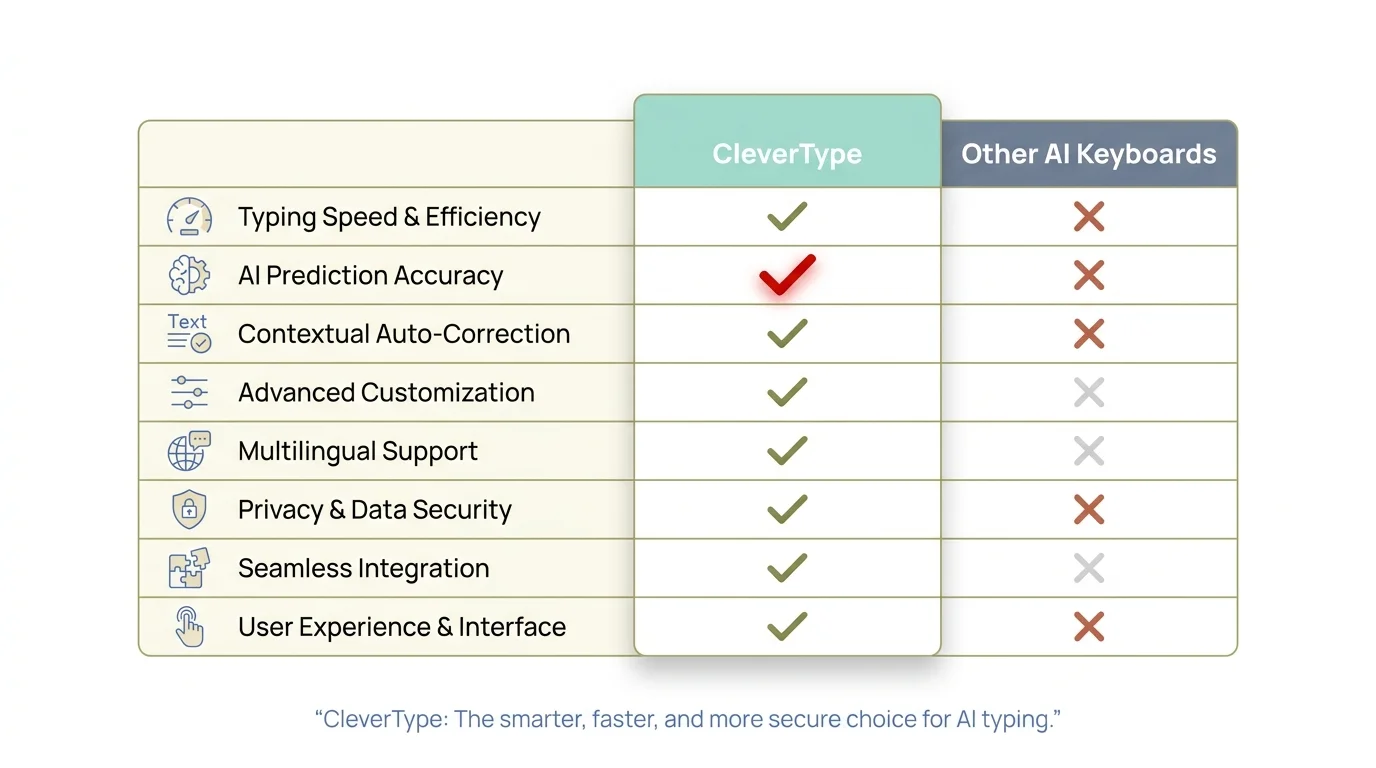
CleverType vs other AI keyboards — battery efficiency and privacy comparison across key metrics
6. How to Reduce CleverType Power Usage
Adjusting a few settings can cut CleverType's battery usage by 30–50% without losing the features that actually matter.
If you want to cut CleverType's power draw even further, here's what actually moves the needle:
1. Turn off voice input when you don't need it
Voice-to-text is the biggest power drain on the list. Consequently, If you use it sometimes, keep it available but not always on. If you barely touch it, just disable it.
2. Reduce suggestion aggressiveness
Moreover, More suggestions means more AI inference calls. Dial it back a bit and you get a lighter workload — and a lighter battery hit.
3. Keep the app updated
Additionally, Performance improvements ship with every update. Moreover, Running an old version can mean more resource usage than the current build needs. Android Police's breakdown of AI battery killers consistently points to outdated app versions as a major culprit.
4. Enable Adaptive Battery on Android
Moreover, Android's Adaptive Battery (Settings > Battery > Adaptive Battery) learns how you use your phone and restricts background activity for apps that only need to run when you're actually in them. Therefore, Worth turning on if it isn't already.
5. Disable features you don't use
Consequently, Smart clipboard monitoring, voice input, auto-reply suggestions — all optional. Furthermore, Each one adds a little overhead. If you're not using a feature, turning it off removes it from the equation entirely.
6. Update Android itself
Newer Android versions are genuinely better at managing keyboard input methods. Hence, Android 14 and 15 both brought real improvements to how the OS handles this — which helps CleverType's efficiency without you doing anything.
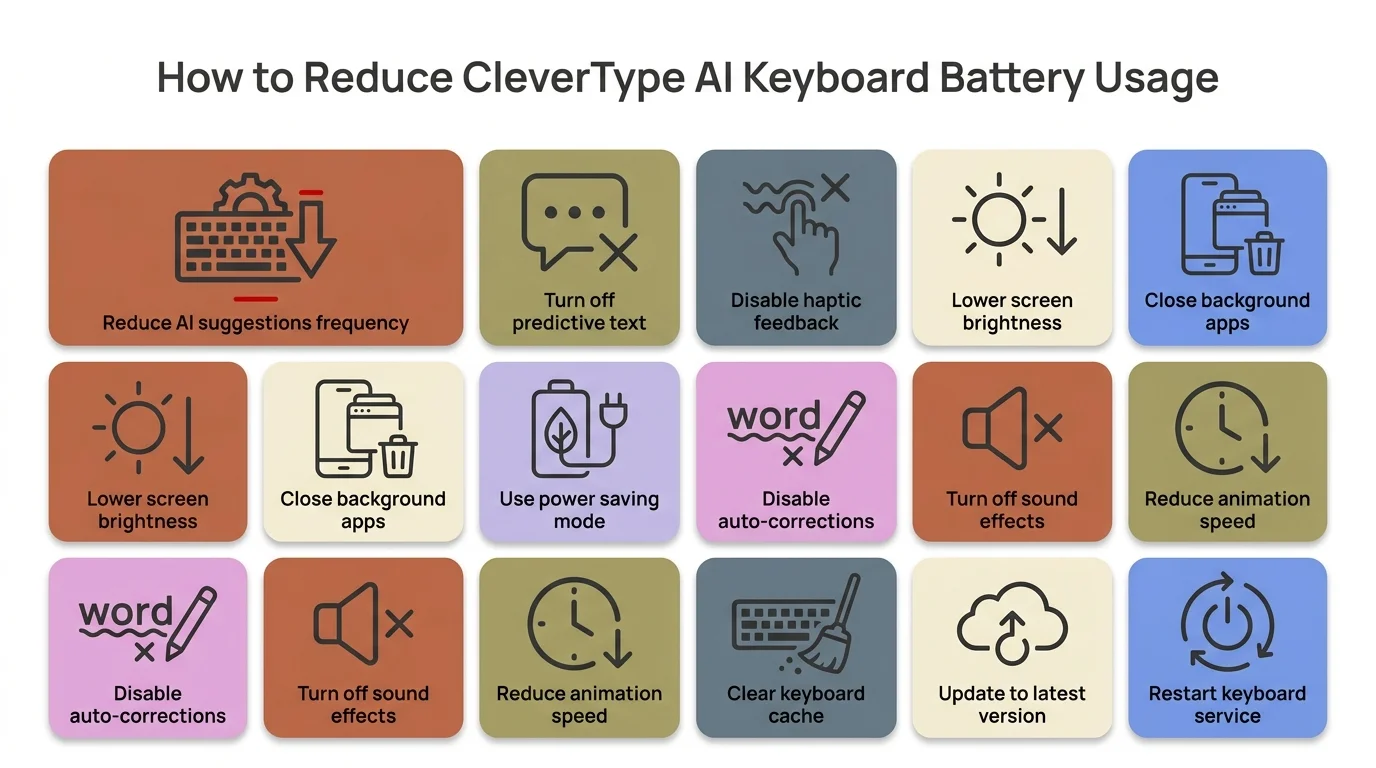
Quick tips to reduce CleverType's battery usage by up to 50% without losing core typing features
7. Does CleverType Run in the Background?
CleverType has near-zero background activity — it only becomes active when you open a text field, which is fundamentally different from apps that run continuous background processes.
Furthermore, Background drain is where most battery-hungry apps actually do their damage. So this one's worth answering properly.
Social media apps are constantly fetching notifications, refreshing feeds, sometimes tracking location. Therefore, Navigation apps keep GPS running after you close them. Music apps buffer ahead. Therefore, Those are the real culprits when you look at most battery reports.
Moreover, CleverType doesn't do any of that. It's a keyboard — it activates when you tap a text field and does nothing the rest of the time. Nonetheless, No background sync, no polling, no uploads, no location access.
Research on how AI apps affect phone battery consistently shows background processes from social apps and utility apps are responsible for most unexpected drain — keyboards barely show up in that analysis.
Hence, Pull up Settings > Battery > Battery Usage on your Android phone. Nonetheless, CleverType almost certainly won't be near the top. The apps sitting there are always the ones with constant background activity — Gmail, Instagram, health trackers, system processes.
Hence, One caveat: if you've got smart clipboard monitoring enabled, that does involve a small amount of background clipboard access. It's minimal, but it's there. Moreover, If you're really trying to minimize everything, turning it off takes it out of the picture.
8. The Bottom Line on CleverType Battery Life
CleverType's impact on battery life is low — under 1% per hour of active typing — and its on-device AI design makes it more efficient than most competitors in the space.
Nonetheless, Does CleverType drain battery? Yeah, technically. Every app does. Hence, But CleverType battery drain sits at the low end for AI keyboards — and significantly lower than apps most people run without thinking twice.
Furthermore, Processing AI locally — which is what protects your privacy — also happens to be better for battery. Nonetheless, No network overhead. Consequently, No radio pings per keystroke. Consequently, No cloud roundtrips for basic text suggestions. Furthermore, It's one of those rare cases where the privacy-first choice and the power-efficient choice are the same choice.
If you're switching from Gboard and worried about battery, you probably won't notice a difference day-to-day. Additionally, If anything, CleverType can replace a few separate apps — grammar checker, clipboard manager, translation tool — rolling them into one keyboard that handles everything locally. Therefore, That's potentially fewer things running in the background overall.
Consequently, Download CleverType from the Play Store and check your battery stats after a week. Hence, Most people find it's either flat or actually a bit better than what they had before.
Frequently Asked Questions
Does CleverType drain battery faster than a regular keyboard?
Moreover, CleverType uses a bit more battery than a basic non-AI keyboard, but we're talking small — under 1% per hour of active typing. Most people won't notice any real change in their daily battery life.
Does CleverType run in the background and drain battery when I'm not typing?
No. CleverType only activates when you open a text field. It has no continuous background processes, no notification polling, and no location tracking that would cause background drain.
Which CleverType feature uses the most battery?
Voice-to-text with AI enhancement is the biggest battery draw. Consequently, Basic text prediction and autocorrect barely register by comparison.
Is CleverType more battery-efficient than Gboard?
Yes, generally. Gboard sends typing data to Google's servers pretty regularly, which keeps the network radio active. Additionally, CleverType handles everything on-device, cutting out that network overhead entirely. That translates directly to lower power usage.
How do I check how much battery CleverType is actually using?
Go to Settings > Battery > Battery Usage on your Android phone. Find CleverType in the list — it shows both foreground and background usage. Most users find it's well under 1% of daily battery.
Does CleverType use more battery on older phones?
Phones without a dedicated NPU chip have to run AI tasks on the CPU, which is less efficient. The battery impact can be a bit higher on devices from 2019 or earlier. Phones from 2021 onward with NPU cores handle it much better.
Will turning off AI features in CleverType save battery?
Yes. Disabling voice input, reducing suggestion frequency, and turning off unused features can reduce CleverType's battery draw by 30–50% while keeping the core typing experience intact.
Ready to Type Smarter?
Moreover, Upgrade your typing with CleverType AI Keyboard. Moreover, Fix grammar instantly, change your tone, receive smart AI replies, and type confidently while keeping your privacy.
Download CleverType FreeAvailable on Android • 100+ Languages • Privacy-First
Share this article:
Sources
- Enovix: The AI Power Drain — Battery Limitations in Mobile AI
- Google Developers Blog: Building On-Device AI with LiteRT and NPU
- Android Developers: Analyze Power Use with Battery Historian
- ResearchGate: Energy Consumption of Machine Learning in Android Apps
- MDPI: Enhancing Smartphone Battery Life with Deep Learning
- HonestWaves: How AI Impacts Phone Battery Life
- Android Police: AI Battery Killers — Why AI Apps Drain Your Phone