Key Takeaways
- •Voice dictation averages 150 WPM vs the typical 40 WPM for keyboard typing — that's nearly 4x faster output with zero hand strain
- •5% of the working population has RSI serious enough to affect daily tasks, with wrist and hand injuries accounting for 36.8% of all cases
- •Carpal tunnel syndrome affects an estimated 3–6% of adults in the general population and is one of the leading causes of workplace disability
- •Modern AI dictation tools now reach 95–99% accuracy out of the box, with zero training required
- •Dragon Professional ($699, Windows-only) is no longer the only serious option — cloud-based Dragon NaturallySpeaking alternatives now match or beat it
- •CleverType's voice-to-text with AI enhancement works on Android and gives you dictation plus smart grammar correction in one keyboard
- •The best approach for RSI is a mix of tools — not replacing typing entirely, but cutting your daily keystrokes by 50% or more
Most people don't think about how much they type until it starts hurting. Hence, Then it's all they think about. Furthermore, If you're dealing with RSI, carpal tunnel, or just that nagging wrist pain that keeps coming back no matter what you do — the keyboard itself has become the problem. Nevertheless, And honestly, no amount of ergonomic mice or wrist rests fixes it. You're still pressing keys hundreds of thousands of times a day.
Here's the thing though — hands free typing software has gotten genuinely good. Not "good enough to tolerate" good. Additionally, Actually good. According to research from the National Center for Voice and Speech, average English speech runs at around 150 words per minute, compared to the typical 40 WPM for keyboard typists. Hence, So you can literally dictate almost four times faster than you type, with zero strain on your wrists.
This guide covers the best dictation software for RSI — how to choose between options, what works on which platform, and how to build a workflow that actually cuts your pain without tanking your output.
What Is RSI and Why Does Typing Make It Worse?
Furthermore, RSI affects 5% of the working population — and keyboard work is one of the most common triggers.
Repetitive Strain Injury (RSI) is actually a broad category of musculoskeletal problems — tendons, nerves, muscles, all of the above — caused by repeated micro-trauma over time. Hands, wrists, forearms, shoulders. Nonetheless, According to Wikipedia's overview of repetitive strain injury, RSI hits roughly 1% of the general population and 5% of the working population. Wrist and hand injuries alone account for 36.8% of all RSI cases — more than any other body part. Therefore, Which tracks, if you've ever spent 8 hours at a keyboard.
Here's what makes keyboard typing specifically rough for RSI:
- Static muscle load — your forearm muscles stay contracted for long periods just holding your hands in typing position, even between keystrokes
- Repetitive micro-movements — each keystroke involves small but forceful flexion and extension of the fingers
- Awkward wrist angle — most keyboards force a slight ulnar deviation (wrist bent outward) that increases pressure on the carpal tunnel
- Vibration and impact — the physical act of pressing keys transmits repeated micro-impacts to the tendons
Consequently, A 2024 scoping review in Frontiers in Public Health confirmed it — occupational carpal tunnel syndrome is directly linked to prolonged computer use, with keyboard work sitting right at the top of the risk factor list. Nonetheless, Cutting your daily keystrokes in half — even just by dictating emails and messages — actually makes a difference. Not a theoretical one.
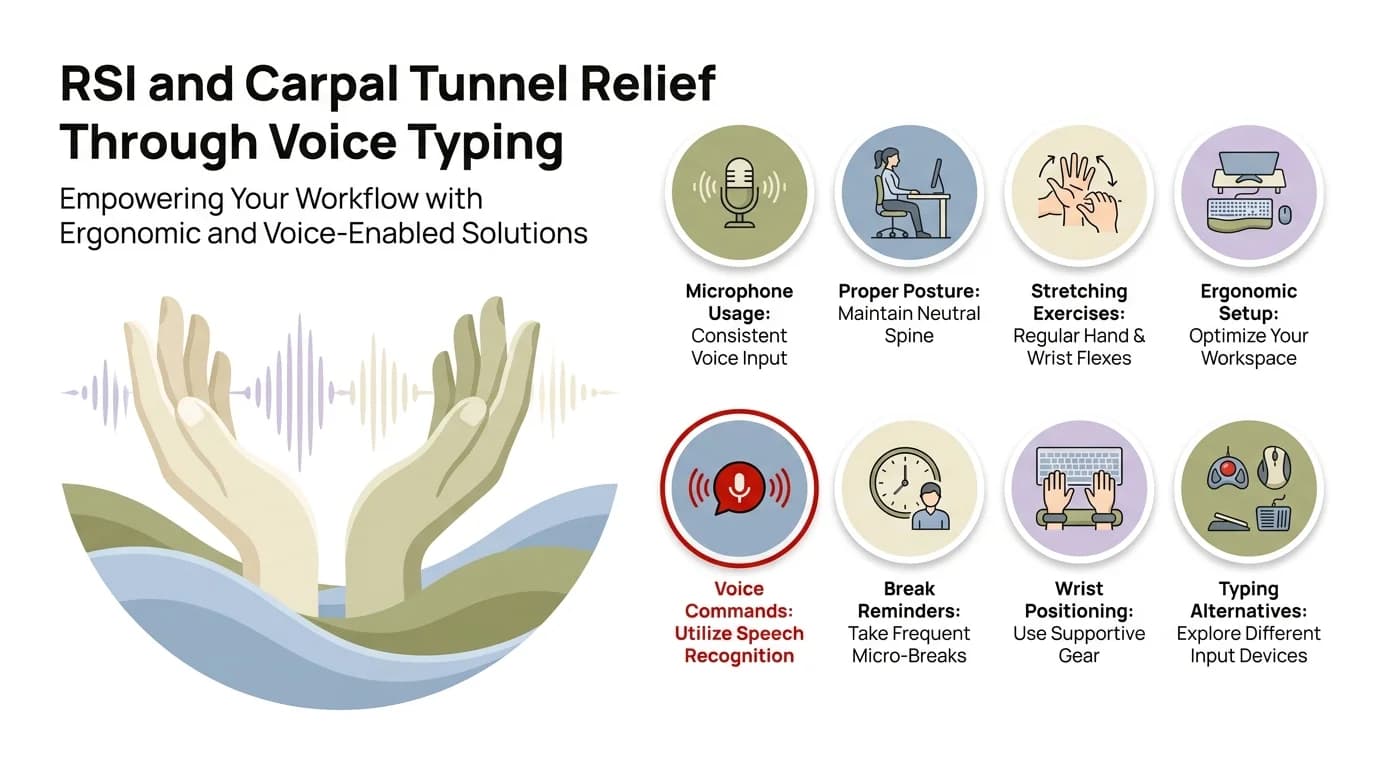
8 proven strategies to relieve RSI and carpal tunnel pain using voice typing and hands-free dictation
How Dictation Software for RSI Actually Works
Modern AI dictation achieves 95–99% accuracy with no training — better than Dragon NaturallySpeaking's 90% out-of-the-box baseline.
Voice-to-text dictation does exactly what it sounds like — converts what you say into typed text using speech recognition AI, so you're not pressing keys at all. Modern AI dictation software for RSI runs on one of two basic setups:
- On-device processing — the speech recognition model runs locally on your device. Faster response, works offline, better privacy. Used by Apple Dictation, Windows Voice Access, and offline Dragon modes.
- Cloud processing — audio is sent to a server, processed by a large language model, and returned as text. Higher accuracy, handles accents and background noise better. Used by Whisper-based apps and most AI-powered dictation services.
Here's a quick reference for the main approaches:
| Method | Accuracy | Platform | Cost | Offline? |
|---|---|---|---|---|
| Dragon Professional | ~90% (improves with training) | Windows only | $699 one-time | Yes |
| Apple Dictation | 85–93% | Mac/iOS | Free | Yes |
| Windows Voice Access | 85–92% | Windows 11 | Free | Yes |
| Google Docs Voice Typing | 90–95% | Browser | Free | No |
| Whisper-based AI tools | 95–99% | Cross-platform | Varies | Limited |
| CleverType Voice-to-Text | 95%+ with AI correction | Android | Free | Partial |
Best Hands-Free Typing Software for Serious RSI (Desktop)
For severe RSI where keyboard use needs to be minimized, these desktop tools give you the most comprehensive hands-free control.
Dragon Professional (Windows)
Dragon Professional is the granddaddy of ergonomic dictation software. $699, Windows only — and yeah, it still does things no other tool does. Nonetheless, Full computer control by voice: menus, cursor movement, custom command macros. Consequently, Dragon for Mac got discontinued in 2018, Dragon Home in 2023. So if you're not on Windows, you're already ruled out.
To be fair — if you're a medical professional or lawyer on Windows who dictates all day, Dragon is still a solid pick. For everyone else? Nevertheless, The $699 price tag and Windows-only limitation are really hard to justify when free options come close on accuracy.
Windows Voice Access (Free, Windows 11)
Additionally, Windows Voice Access is built right into Windows 11 and almost nobody knows about it. It lets you:
- Dictate text in any application
- Navigate the screen by saying element names or grid overlays
- Open apps, click buttons, and scroll — all by voice
- Control the mouse cursor verbally
Nonetheless, Not as accurate as Dragon, and you can't build custom vocabularies with it. Consequently, But it's free and works everywhere on your system. Consequently, If you're just starting to wean yourself off the keyboard, this is the obvious place to start.
Google Docs Voice Typing (Free, Browser)
Moreover, Open Google Docs, go to Tools > Voice Typing, and you've got a genuinely decent accessible voice typing option that's completely free. It handles natural speech well and lets you say "comma," "period," "new line" to handle punctuation. Hence, The catch — and it's a big one — is that it only works in Google Docs in Chrome. Furthermore, Good for document writing, useless for anything else.
Talon Voice (Free, All Platforms)
Talon Voice is the nuclear option — for people with severe RSI who need full computer control. Additionally, It replaces both keyboard and mouse entirely, using voice commands, a custom phonetic alphabet, and optional eye-tracking or noise input. The learning curve is significant. Like, genuinely steep. Therefore, But for people who literally cannot type anymore, it's life-changing. Additionally, Free, open-source, and runs on Mac, Windows, and Linux.
Best Dictation Apps for RSI on Mobile
Most people with wrist pain feel it more on mobile — the pinching grip and constant tapping adds up fast.
For voice to text carpal tunnel relief on phones, you've got a few options — built-in system tools on one end, AI-enhanced keyboards that do more on the other.
Apple's Built-In Dictation (iOS)
Tap the microphone icon on any iOS keyboard and you're in. Apple's on-device dictation is accurate, private, works offline. The annoying part? Nevertheless, It cuts out after 60–90 seconds of continuous speech, which makes longer content pretty awkward to dictate.
Google Voice Typing (Android)
Nevertheless, The default Google voice typing on Android works well enough for short bursts. Nevertheless, It doesn't time out as aggressively as Apple's, and it handles multiple languages well. That said, your audio goes to Google's servers — worth knowing if privacy is a concern.
CleverType — AI Voice-to-Text With Enhancement
Hence, CleverType goes a step further with the voice to text carpal tunnel use case. Nonetheless, You dictate, and it doesn't just transcribe — the AI cleans up grammar, fixes the punctuation errors voice recognition almost always gets wrong (their/there/they're, that kind of thing), and surfaces smart suggestions on top of what you said.
Honestly, this matters most for anyone whose dictation accuracy tends to dip — background noise, accent, whatever the reason. Nevertheless, Instead of garbled output that you then have to manually fix (with your wrists...), the AI layer catches the common errors automatically. Nevertheless, CleverType also keeps your data on-device, which is more than you can say for the default Google option. For Android users with RSI, it's one of the better AI keyboard tools for Android out there. Download CleverType free on Android and try it.
Voice Typing Speed vs Typing: The Productivity Case
Voice dictation runs at 150 WPM on average vs 40 WPM for typing — a nearly 4x difference.
Therefore, The case for rsi productivity tools based on dictation isn't just about pain relief — it's that it's genuinely faster. Nevertheless, A lot faster. Moreover, According to data from the National Center for Voice and Speech, conversational English averages around 150 words per minute. The average office worker types at about 40 WPM. Moreover, That gap is real.
Here's how the time math looks for common tasks:
| Task | Typing (40 WPM) | Dictation (120 WPM effective) | Time Saved |
|---|---|---|---|
| 500-word email | ~12 minutes | ~4 minutes | 67% |
| 1,000-word report | ~25 minutes | ~8 minutes | 68% |
| Short chat messages (50 words) | ~75 seconds | ~25 seconds | 67% |
| Meeting notes (800 words) | ~20 minutes | ~7 minutes | 65% |
Hence, One honest caveat though: a lab study cited across several ergonomics papers found that while voice input does reduce muscle load, your productivity might actually dip at first during the learning phase. Not forever — just initially. Give yourself 2–3 weeks before deciding if it's working or not.
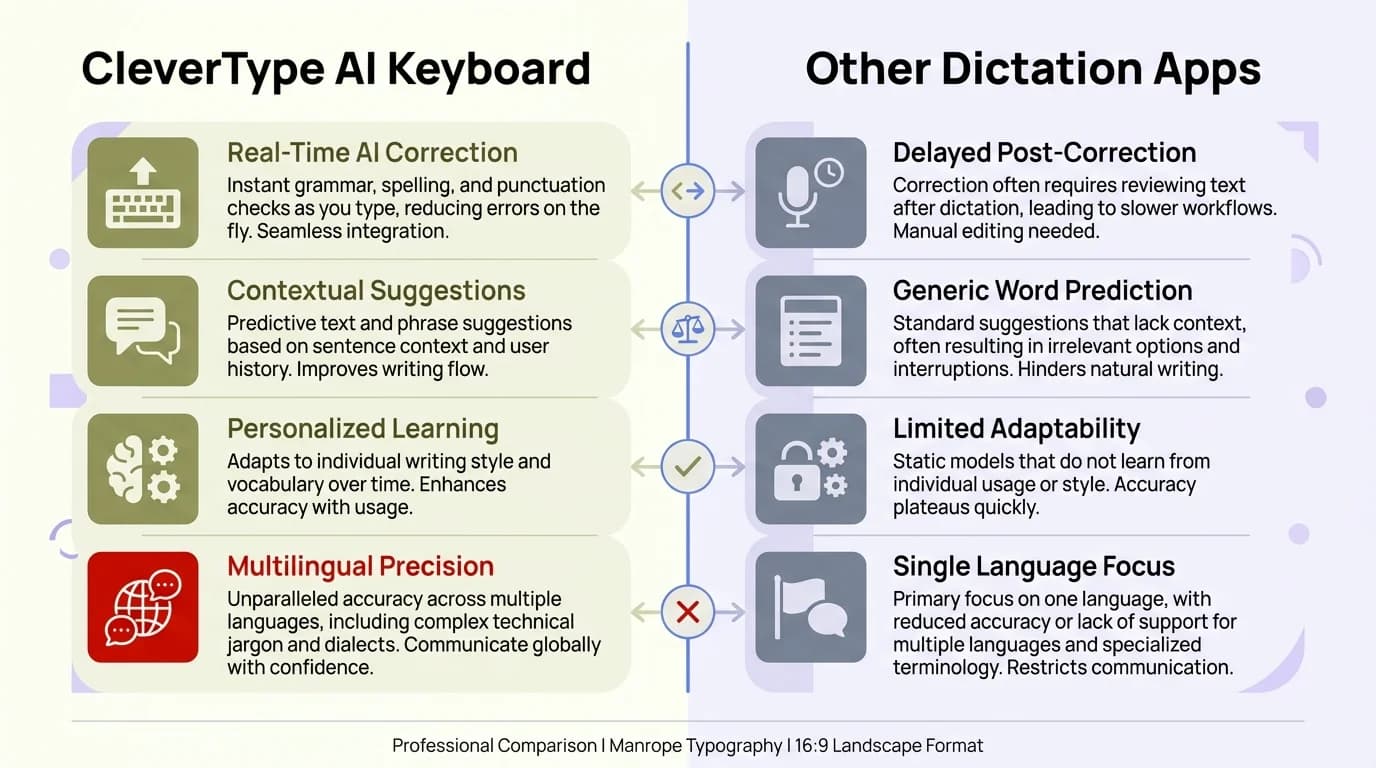
CleverType AI Keyboard vs other dictation apps: how AI-enhanced voice-to-text gives Android users a clear advantage for RSI recovery
Building a Workflow That Actually Reduces RSI Pain
The most effective approach is reducing daily keystrokes by 50%+ rather than eliminating typing entirely — a mixed workflow is more sustainable.
Nonetheless, The most common mistake when starting out with typing alternative for wrist pain tools? Additionally, Going all-in immediately and then getting frustrated when dictation doesn't handle everything. Hence, Some tasks — coding, filling forms, spreadsheet navigation — just don't work as naturally with dictation as prose writing does. Moreover, And that's fine. You don't need it to do everything.
Best suited for dictation:
- Emails and messages
- Document drafting and content creation (first drafts especially)
- Meeting notes and action items
- Brainstorming and journaling
- Slack/Teams messages
Moreover, Still better with keyboard:
- Code writing (though Talon Voice has specific grammars for this)
- Form filling with short discrete fields
- Spreadsheet data entry
- Any task requiring precise cursor positioning
Nonetheless, Hybrid approach that works well:
- Dictate your first draft completely — don't stop to edit while speaking
- Edit and correct using keyboard, but keep editing sessions short
- Use keyboard shortcuts to minimize non-typing keyboard use
- Take micro-breaks every 20–25 minutes regardless
Additionally, According to CDC guidance on ergonomic injury prevention, reducing cumulative loading — total daily strain, across everything you do — matters more than any single intervention. Furthermore, A 50% reduction in daily keystrokes through a mix of dictation and keyboard use gives your tendons actual recovery time. That's the goal.
Comparing the Best Dictation Apps Side by Side
Moreover, The right tool depends on your platform, budget, and how severe your RSI is — there's Therefore, no single best pick.
| App | Platform | Price | Accuracy | RSI Best Use |
|---|---|---|---|---|
| Dragon Professional | Windows | $699 | 90%+ (trained) | Full-time professional dictation |
| Talon Voice | Mac/Win/Linux | Free | High (custom grammar) | Severe RSI, full hands-free control |
| Windows Voice Access | Windows 11 | Free | 85–92% | Entry-level, everyday dictation |
| Apple Dictation | Mac/iOS | Free | 85–93% | Casual dictation on Apple devices |
| Google Docs Voice Typing | Browser | Free | 90–95% | Document writing in browser |
| CleverType | Android | Free | 95%+ (AI-enhanced) | Mobile RSI, voice + AI grammar correction |
For Android specifically, CleverType's combination of voice input, AI correction, and on-device privacy makes it stand out from the pack. Gboard sends your keystrokes and voice input to Google's servers. Additionally, SwiftKey predicts what you'll type next but doesn't touch what you've already said. CleverType actually fixes the output — which is what matters when you're dictating.
Tips From Someone Who Has Used Dictation for RSI Recovery
These are the things that make the difference between dictation being a relief and it being another source of frustration.
Having worked through more than a few bouts of wrist tendinitis with these tools, here's what no product page tells you:
- Don't edit while you dictate. Seriously. The biggest productivity killer is stopping every few words to fix recognition errors. Speak in complete thoughts, finish your sentence, then go back and correct. It feels wrong at first — almost uncomfortable. But it makes the whole thing about 3x more usable.
- Learn your tool's punctuation commands before anything else. Saying "period new line" or "comma" becomes second nature fast, but if you skip this step you'll spend way too much time fixing punctuation by hand — which means more keystrokes, which defeats the whole point.
- Your voice gets tired too — this one surprises people. Keep water nearby, don't speak at a strained volume, and if you're dictating for several hours, take vocal rest breaks. The goal is reducing total strain, not just swapping wrist pain for throat problems.
- Background noise kills accuracy more than anything else. A $40 headset mic will consistently beat a laptop microphone every time. If your recognition is feeling rough, fix the mic first — before blaming the software.
- Give the learning curve real time — not three days, but actual weeks. According to ScienceDirect research on voice recognition adaptation, productivity typically dips before it climbs past baseline. Most people who give up on voice typing do it in week one or two. Right before it clicks.
- Use an AI keyboard during the editing phase. When you're fixing small errors after a dictation session, having smart AI grammar correction means fewer precise keystrokes to make the text right. CleverType is especially useful here — it handles a lot of the cleanup automatically.
Frequently Asked Questions
Q: What is the best dictation software for RSI?
Depends on your platform and how severe things are. Hence, Windows power users get the deepest computer control from Dragon Professional. If you want free, Windows Voice Access (Windows 11) and Apple Dictation are both solid. Nonetheless, On Android, CleverType pairs voice-to-text with AI grammar correction — which makes it more complete than most mobile options.
Q: Can voice typing completely replace keyboard typing for carpal tunnel?
Rarely, if ever. Hence, Voice typing can dramatically cut down your keyboard use, but tasks like coding, spreadsheets, and form filling are still awkward to dictate. Realistically, reducing your daily keystrokes by 50–70% through dictation is a solid, achievable target — and for most people with carpal tunnel, that's enough to make a genuine difference.
Q: How accurate is modern dictation software?
Pretty high, actually. Modern AI-powered dictation tools hit 95–99% word accuracy with zero training required. The free built-ins — Apple Dictation, Windows Voice Access — land around 85–93%. Dragon Professional starts at about 90% and gets better the more you use it.
Q: Is there free dictation software for RSI?
Yes — several of them. Windows Voice Access (free in Windows 11), Apple Dictation (free on Mac and iOS), and Google Docs Voice Typing (free in Chrome) are all genuinely capable without costing anything. Furthermore, CleverType is also free on Android and layers AI enhancement on top of basic voice input.
Q: Does voice typing actually help with RSI pain?
Furthermore, Yes — and the research backs it up pretty clearly. Voice typing significantly reduces static muscle load in the forearms and hands compared to keyboard use. The CDC lists reducing cumulative daily strain as a core RSI management strategy, and swapping even 50% of your typing for dictation gives strained tendons real recovery time.
Q: What's the difference between dictation software and voice control software?
Additionally, Short answer: dictation software converts speech to text only. Voice control software — Talon Voice, Windows Voice Access — goes further and lets you actually control the computer by voice. Opening apps, clicking, scrolling, all of it. Nonetheless, If your RSI is severe enough that you need to minimize all hand movement, voice control is the more useful category.
Q: Can I use dictation software on my phone for RSI?
Nonetheless, Yes — both iOS and Android have built-in voice typing right on the keyboard microphone button. Additionally, If you need something more capable on Android, CleverType adds AI-enhanced voice-to-text with automatic grammar correction on top. Nonetheless, Dictated text comes out cleaner, with less manual editing needed.
Ready to Type Smarter?
Upgrade your typing with CleverType AI Keyboard. Moreover, Fix grammar instantly, change your tone, receive smart AI replies, and type confidently while keeping your privacy.
Download CleverType FreeAvailable on Android • 100+ Languages • Privacy-First
Share this article:
Sources:
- Repetitive Strain Injury — Wikipedia
- Occupational Carpal Tunnel Syndrome: Scoping Review — Frontiers in Public Health (2024)
- Voice Production Tutorial — National Center for Voice and Speech
- Ergonomics and Musculoskeletal Disorders — CDC NIOSH
- Researching the Use of Voice Recognition Writing Software — ScienceDirect
- Management of Carpal Tunnel Syndrome — AAOS Clinical Practice Guideline 2024